 advanza
Put your follow-ups on autopilot.
Build visual workflows that turn form submissions, email activity and CRM changes into timely follow-ups and sales handoffs.
Build, preview and validate in one visual workspace.See the whole journey before it runs.
Start with a trigger, connect actions on the canvas, and configure each step alongside the flow. Switch between compact and detailed views, tidy the layout, then preview and validate before activation.
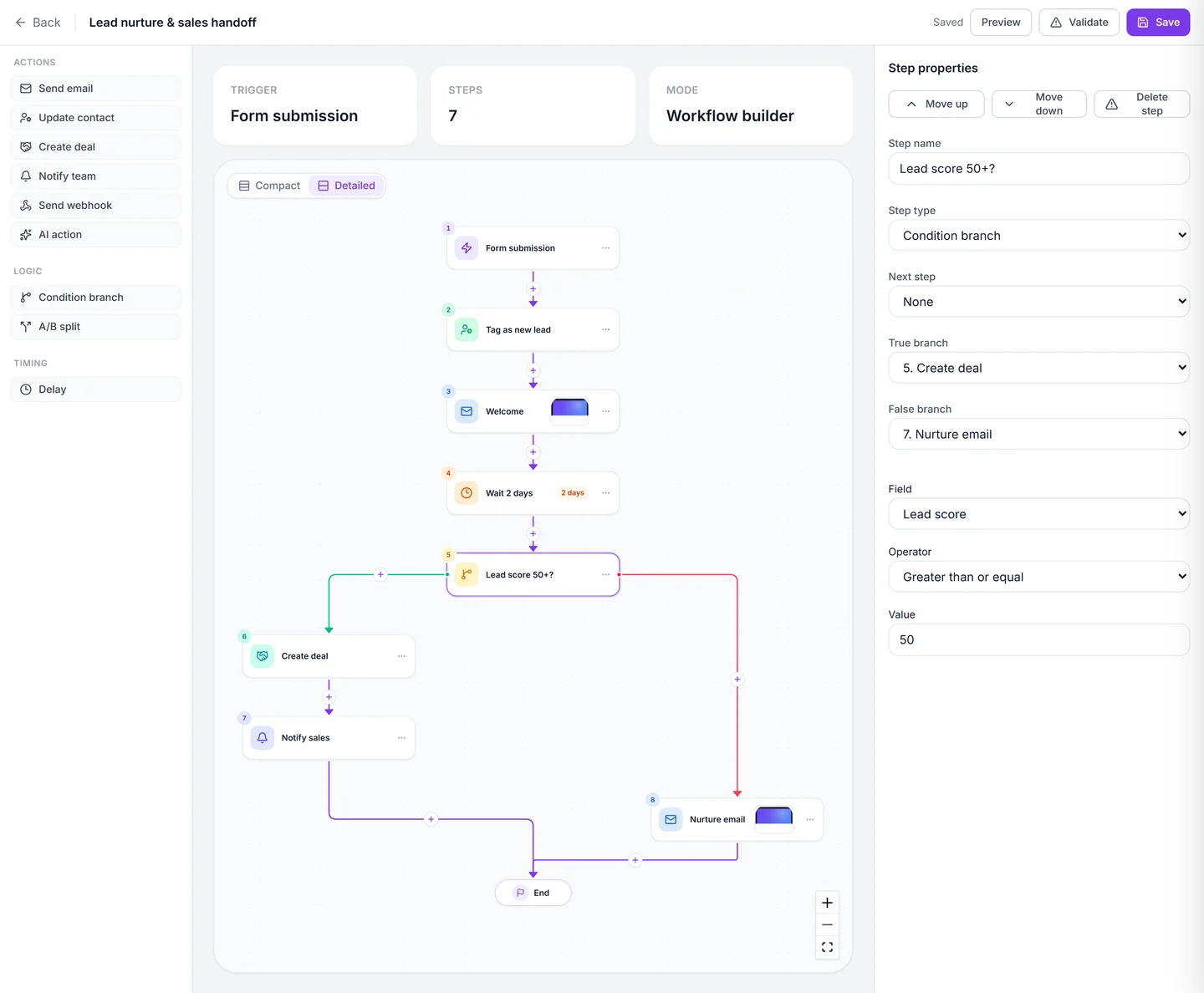
- Add email, CRM, notification, webhook and AI actions from the step palette.
- Follow the connections from the trigger to each outcome.
- Switch between compact and detailed views, or tidy up the canvas.
Start when the moment is right.
Welcome a new enquiry after a form submission or follow up after a tracked landing-page visit. Pick the event and narrow it to the forms, pages, campaigns or CRM changes that matter.
- Start from a form submission, email activity, page visit or CRM change.
- Run on a one-time or recurring schedule, or start manually for a contact.
- Accept an incoming webhook and map payload values to contact fields.
Give each contact the right next step.
Let an enquiry settle before sending a reminder, or route a qualified lead straight to sales. Build paths around the contact details you already have.
- Wait a set number of seconds, minutes, hours or days.
- Branch on contact data such as lifecycle stage, lead score or a custom field.
- Use an A/B split to send contacts down two different paths.
Connect the email to the handoff.
Send a welcome email, update the contact, create a deal and let the owner know. Chain these actions on the same canvas so each step can follow the one before it.
- Use an existing email or template, or write one for the step. Preview it and send from a connected mailbox.
- Update contact fields, create a deal in a selected pipeline stage, or notify a teammate.
- Send data to another system via webhook or run an AI prompt using workflow variables.
See where each run stands.
Once a workflow is active, open its run history to see who entered, what ran and where a contact is waiting.
- Filter runs by contact, date or status and open the steps for an individual run.
- Review failures and retry a run when appropriate.
- Pause the workflow when you need to stop it.
Keep the momentum going.
Good to know.
How could I follow up after a webinar signup?
Start with the registration form, send a confirmation, then add a delay before a follow-up. You can use a condition to route qualified leads to your sales team.
How do workflows work with other tools?
An incoming webhook can start a workflow and map event data to a contact. An outgoing webhook step can pass data to another system during the run.
Big ideas.
Less busywork.
Bring your marketing together with Advanza.
Start free Free plan · No card required