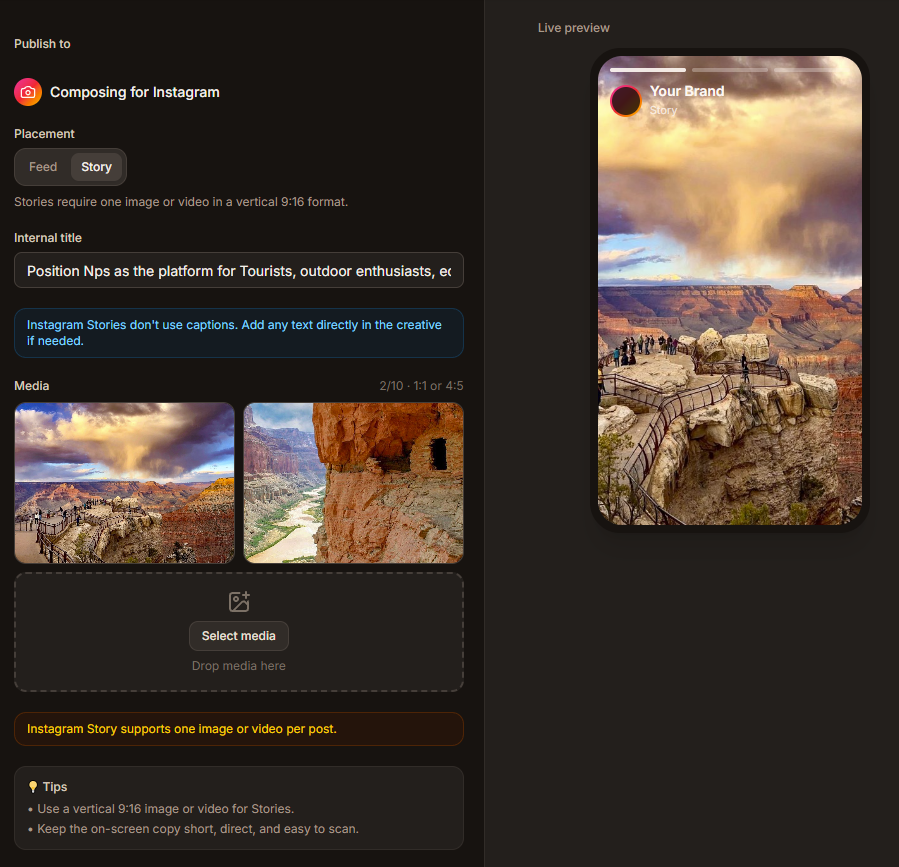
Multi-channel social posting

One idea, posted properly to every channel you're on.

Write the post once. Advanza shapes a version for Facebook, Instagram, LinkedIn, X, and Pinterest — then schedules, publishes, and measures all of them from one place.

Advanza content composer
Why it helps

Posting everywhere shouldn't take all morning

Most teams cross-post the same caption and hope for the best. Advanza writes each version properly and publishes them together.

5
Social networks

One idea, every channel

Describe the post once. Advanza writes a version for each network you publish to.

0
Copy-paste rewrites

Written per platform

Short for X, longer for Facebook, a point of view for LinkedIn — not one caption pasted everywhere.

1
Calendar to check

Scheduled in one calendar

Queue a whole week across every channel and see the full plan on a single screen.

24h
To first numbers

Results in the same place

Reach, engagement, and clicks land back next to the post that earned them.

How it works

From one sentence to five posts

Four steps, start to published.

  1. 01

    Describe the post

    Say what you want to say, in plain language.

  2. 02

    Pick your channels

    Advanza drafts a tailored version for each one.

  3. 03

    Review every version

    Edit anything. Nothing publishes until you approve it.

  4. 04

    Publish or schedule

    Send now, or queue it and watch the results come in.

See it in action

Watch a campaign built and published

From the first prompt to a scheduled multi-channel launch, then straight into the numbers.

Build an email campaign on the block canvas, send it to a segment, and follow opens, clicks, and revenue in the same workspace.

What's inside

Everything the posting workflow needs

Built so a small team can keep every channel active without hiring for it.

Five networks, one composer

Facebook Pages, Instagram, LinkedIn profiles and company pages, X, and Pinterest — connected once and published from the same screen.

Channel-aware copy

Each version is written for its platform's length, tone, and pace, in your voice rather than a generic AI one.

Images that fit each post

Generate campaign visuals in the composer, sized and cropped for the network you are posting to.

Hashtags and first comments

Tags, links, and first comments are placed where each platform actually wants them, automatically.

Scheduling and queues

Plan a week or a month ahead across every channel, and move a post by dragging it to a new slot.

Per-post performance

See reach, engagement, and clicks for every network side by side, so you know which one is worth the effort.

Post to every channel this week

Connect your accounts, describe one campaign, and watch Advanza write and schedule the rest.

  • Start free
  • No complicated setup