LinkedIn

Schedule LinkedIn posts that don't read like an advert

LinkedIn punishes copy-paste marketing. Advanza schedules posts with an actual point of view and publishes them to your personal profile, your company page, or both.

From this one line

Autumn breaks — three nights for the price of two, booked before 30 September.

LinkedIn

Profile or company page post

We're opening our autumn rate today: three nights for the price of two, on anything booked before 30 September. Shoulder season is where independent hotels either fill or fold. We'd rather run near capacity at a lower rate than sit half empty at full price — and the guests who come in October are reliably the ones who come back in June. Booking link in the comments.

On LinkedIn

What Advanza does on LinkedIn

You approve it. Advanza handles everything else about getting it onto the platform properly.

  • Writes with a point of view, because a pure advert dies on LinkedIn
  • Publishes to your personal profile, your company page, or both
  • Puts the link in the first comment, where LinkedIn prefers it
  • Keeps the formatting LinkedIn actually renders — no lost line breaks
Worth knowing

What's different about LinkedIn

The rules that make this channel its own job — and what Advanza does about each one.

Two identities, one connection

Your personal profile and your company page are different audiences with different voices. Advanza treats them as separate targets, so a company-page post isn't just your personal post with the name swapped.

The link goes in the comments

Posts with external links in the body reach fewer people. Advanza publishes the post first, then adds your link as the first comment.

Written for skim-reading

Short opening line, a gap, then the substance — the structure LinkedIn's 'see more' fold rewards.

What you need to connect

  • A LinkedIn account
  • Admin rights on the company page, if you want to post there
  • One approval — Advanza does the rest

Your profile and your company page are not the same audience

Most tools treat LinkedIn as one destination with a dropdown on top. Post goes out, name on it changes, done. It reads exactly like what it is.

The two are different jobs. A personal post can have an opinion, admit a trade-off, and speak in the first person. A company page post is the business talking, so the same sentence has to carry differently — and the reader knows which one they are looking at.

Advanza treats them as separate targets. Pick one, or both, and each gets its own version of the idea rather than one version published twice with the byline swapped. Posting to the company page needs admin rights on it; posting to your profile needs nothing beyond connecting your account once.

Why the link goes in the first comment

LinkedIn consistently shows posts containing an external link in the body to fewer people than posts without one. It is not a rule anyone published, but it has been stable long enough that the whole platform writes around it.

The standard workaround is to publish the post clean and add the link as the first comment. Everyone who works on LinkedIn does this manually. It means being at your desk when the post goes out, which quietly cancels most of the benefit of scheduling in the first place.

Advanza publishes the post, then adds the link as the first comment, as a second step you do not have to be present for. If that second step fails, the post stays up and Advanza flags the comment as the thing that did not happen — so you can add it yourself in ten seconds instead of discovering a week later that your best-performing post had nowhere to click.

The formatting LinkedIn actually renders

LinkedIn's editor is unforgiving in small ways. Line breaks get eaten in transit from tools that hand over the wrong kind of newline. The "see more" fold cuts at a point you cannot see while writing. Anything longer than about three lines is a decision to lose most of your readers at the fold.

Advanza writes to that shape on purpose: a short opening line, a deliberate gap, then the substance. What you approve is what renders — the line breaks survive, because the post is composed in the format LinkedIn expects rather than converted at the last moment.

Images are handled the same way. Advanza uploads the file to LinkedIn directly rather than linking to it and hoping for a preview card. If that upload cannot complete, the publish fails and says so. It will not fall back to posting your words without the picture you approved.

What Advanza will not do on LinkedIn

Worth saying plainly, because a lot of LinkedIn tooling sells the opposite.

Advanza publishes posts and their first comment. It does not send connection requests, does not message anyone, does not comment on other people's posts on your behalf, and does not join engagement pods or anything resembling one. There is no mode that makes it act like you while you are not there.

That is partly a principle and partly self-interest: automated engagement is the fastest way to have a LinkedIn account restricted, and the account at risk would be yours rather than ours.

What you get is narrower and duller than the growth-hack pitch. The writing is drafted for you, the posting happens on schedule, the link lands in the comments, and the conversation underneath the post is still yours to have. On LinkedIn that last part is the bit that actually works, and it is not something worth automating away.

Whether it sounds like you wrote it

This is the only question that matters on LinkedIn, and it deserves a straight answer rather than a reassurance.

Advanza learns your tone from your website and from what you have posted before, so the first draft starts closer to your voice than a blank prompt would. It is a starting point, not a verdict.

Then you read every post before it goes out. Not a sample, not the first one — every post, on every channel, sits in front of you with an edit box. Anything that does not sound like you never publishes, because approval is a step rather than a setting you can leave on.

The realistic promise is not that a machine writes exactly like you. It is that rewriting a draft that is eighty per cent right takes two minutes, and starting from nothing takes twenty — and twenty minutes per channel per week is the reason most small businesses stop posting.

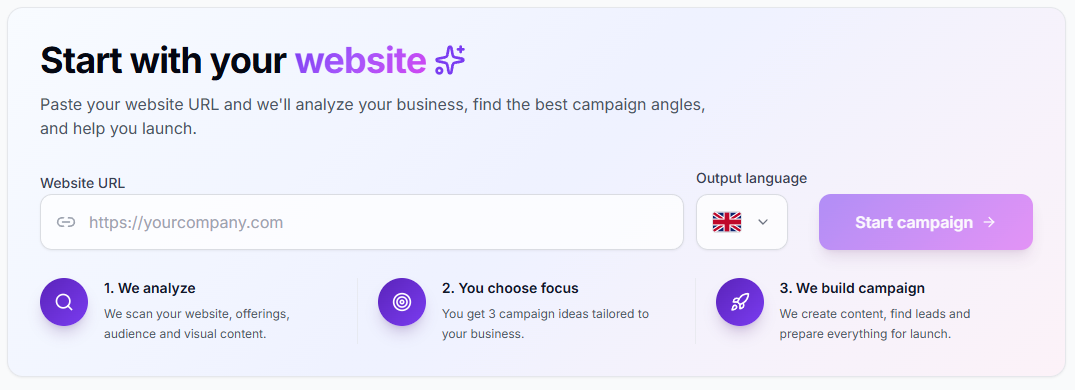
Advanza's campaign starter, where pasting a website URL produces campaign angles
A LinkedIn post starts from the same place every other channel does: your website, read back to you as a handful of campaign angles you can pick from.
How it compares

Publishing to LinkedIn: three ways

The LinkedIn-specific work — two identities, the link in the comments, formatting that survives — is the part tools usually leave to you.

Publishing to LinkedIn with Advanza, with a typical scheduler, or by hand
What is being comparedAdvanzaA typical schedulerBy hand
Profile and company pageSeparate posts, written for eachOne post, retargetedYou write both
Link in the first commentPosted automatically after publishRarelyYou return to the post
Who writes the draftAdvanza, in your tone, you approveYou doYou do
ImagesUploaded to LinkedIn, or the publish fails loudlyVariesYou upload them
The same idea elsewhereFacebook, Instagram, X, Pinterest and email, written separatelySame text, re-postedYou rewrite it each time

Publishing to a company page requires admin rights on that page — LinkedIn's requirement, on any tool.

Questions

LinkedIn, answered

Can I post to my company page and my own profile?

Yes, and they're treated as separate targets. Advanza writes each one appropriately rather than publishing identical text twice.

Why does the link go in the first comment?

LinkedIn consistently shows posts with external links in the body to fewer people. Putting the link in the first comment is the standard workaround, and Advanza does it for you automatically.

Will it sound like AI wrote it?

Advanza learns your tone from your website and your previous posts, and you approve every post before it publishes — so anything that doesn't sound like you never goes out.

The same idea also goes to

Write it once. Post it to LinkedIn and everywhere else.

Start free, describe what you're promoting, and read what Advanza writes for each of your channels before a single thing publishes.

  • Start free
  • No complicated setup